우리는 더 개인화되고 더 부드러운 경험을 제공하기 위해 쿠키를 사용합니다. 이 웹사이트를 방문하면 쿠키 사용에 동의하는 것 입니다. 쿠키를 허용하지 않거나 추가 정보가 필요한 경우 당사의 개인 정보 보호 정책을 방문하십시오.
필수 쿠키 이 쿠키는 웹사이트의 정상적인 작동에 필수적이며 비활성화할 수 없습니다.
분석 쿠키 이 쿠키는 방문자가 웹사이트를 어떻게 사용하는지 파악하는 데 도움이 됩니다.
마케팅 쿠키 이 쿠키는 방문자를 추적하고 관련 광고를 표시하는 데 사용됩니다.
소셜 미디어 쿠키 이 쿠키를 사용하면 소셜 미디어에서 페이지와 콘텐츠를 공유할 수 있습니다.
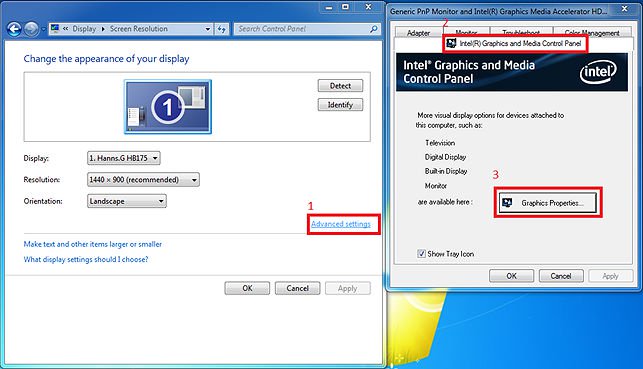
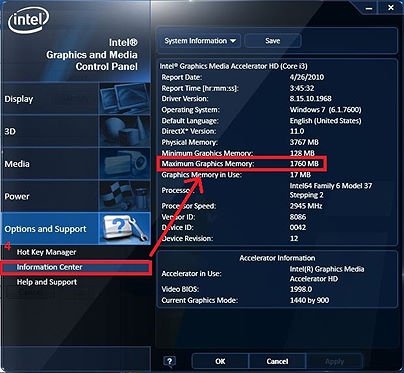
Q: Where could I get the maximum share memory on H55 series motherboards?(7/15/2010) A: The shared memory size is dynamically controlled by VGA driver, and the maximum share memory size will be available only when more than 4GB memory is installed under 64-bit OS. Please kindly refer to the following steps to check the maximum graphic share memory.
1.Visit the "Display" option in the control and choose "Advanced setting".
2.Choose ""Intel® Graphic and Media Control Panel.
3.Click the "Graphic Properties.'
4.Visit the "Option and support" and choose "Information Center".
5.Then you could see the information at the right side.
 메뉴
메뉴