우리는 더 개인화되고 더 부드러운 경험을 제공하기 위해 쿠키를 사용합니다. 이 웹사이트를 방문하면 쿠키 사용에 동의하는 것 입니다. 쿠키를 허용하지 않거나 추가 정보가 필요한 경우 당사의 개인 정보 보호 정책을 방문하십시오.
필수 쿠키 이 쿠키는 웹사이트의 정상적인 작동에 필수적이며 비활성화할 수 없습니다.
분석 쿠키 이 쿠키는 방문자가 웹사이트를 어떻게 사용하는지 파악하는 데 도움이 됩니다.
마케팅 쿠키 이 쿠키는 방문자를 추적하고 관련 광고를 표시하는 데 사용됩니다.
소셜 미디어 쿠키 이 쿠키를 사용하면 소셜 미디어에서 페이지와 콘텐츠를 공유할 수 있습니다.
Q: With ION330, Under Windows® XP, I can not wake up system from S3 and S4 by USB keyboard mouse, why?(8/11/2009) A: Please refer to the steps as below to solve the issue.
1.Please download a registry from the link as below,
https://download.asrock.com/Drivers/others/NVUSBS3.zip
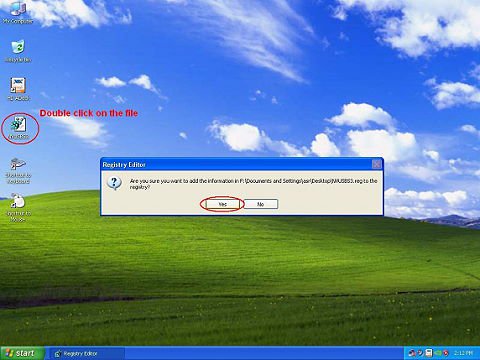
2.Referring to the picture, please double click on the file NVUSBS3, and click YES.
After the registry is complete, a window may shows up, please press OK and RESTART your computer.
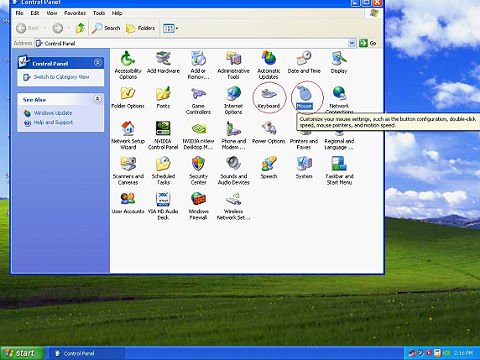
3.Referring to the picture, double click on Keyboard and Mouse in START -> Control Panel.
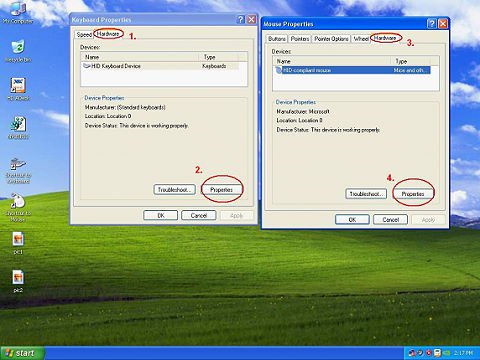
4.Referring to the picture, move to Hardware tags as 1. and 3., click on Properties as 2. and 4.
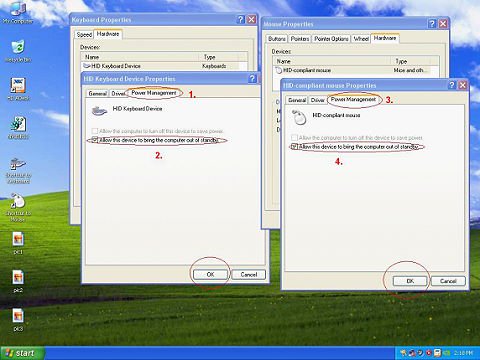
5.Referring to the picture, move to Power Management tag as 1. and 3.
Check Allow this device to bring the computer out of standby in BOTH Keyboard and Mouse windows, as 2. and 4.
6.Now it's available for you to bring your computer from S3 and S4 with your USB keyboard and mouse.
 메뉴
메뉴