우리는 더 개인화되고 더 부드러운 경험을 제공하기 위해 쿠키를 사용합니다. 이 웹사이트를 방문하면 쿠키 사용에 동의하는 것 입니다. 쿠키를 허용하지 않거나 추가 정보가 필요한 경우 당사의 개인 정보 보호 정책을 방문하십시오.
필수 쿠키 이 쿠키는 웹사이트의 정상적인 작동에 필수적이며 비활성화할 수 없습니다.
분석 쿠키 이 쿠키는 방문자가 웹사이트를 어떻게 사용하는지 파악하는 데 도움이 됩니다.
마케팅 쿠키 이 쿠키는 방문자를 추적하고 관련 광고를 표시하는 데 사용됩니다.
소셜 미디어 쿠키 이 쿠키를 사용하면 소셜 미디어에서 페이지와 콘텐츠를 공유할 수 있습니다.
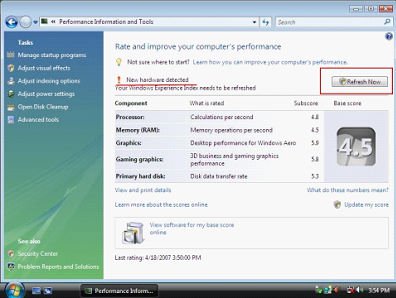
Q: I'm using Windows® Vista™. I just installed a new VGA card, but the screen gets abnormal display. Is there anything I should do?(4/20/2007) A: After you install a new hardware device (especially VGA card) under Windows® Vista™, we suggest re-rating your system (refer to the following steps). It may be able to solve the problem.
1.Go to Start > Control Panel > System and Maintenance> Performance Information and Tool
2.You will see the above screen. Press "Refresh Now" to re-rate your system.
 메뉴
메뉴