We use cookies to offer you a more personalized and smoother experience. By visiting this website, you agree to our use of cookies. If you prefer not to accept cookies or require more information, please visit our Privacy Policy.
Necessary cookies These cookies are essential for the proper functioning of the website and cannot be turned off.
Analytics cookies These cookies help us understand how visitors use our website.
Marketing cookies These cookies are used to track visitors and display relevant advertisements.
Social media cookies These cookies allow you to share pages and content on social media.
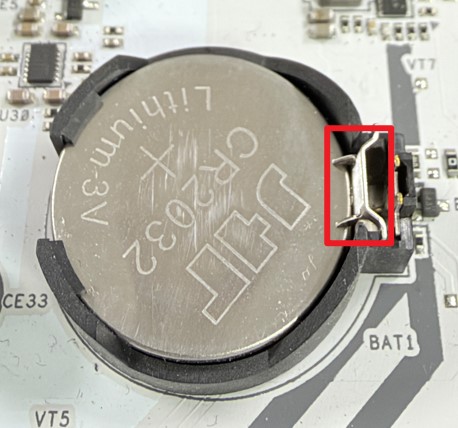
Question: How to replace the CMOS battery(10/12/2026) Answer: For the motherboards with a regular CR2032 battery:
1. Locate the battery on the board.
On some models, it will be under a heatsink.
The motherboard layout drawing in the user manual often shows the location.
2. Push the latch to the side to release the battery.
3. Replace the battery with a new one.
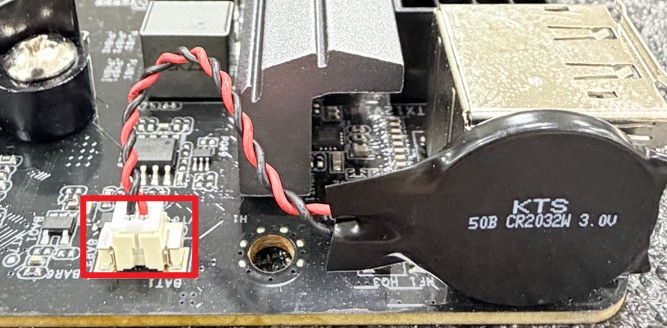
For the motherboards with a wired CR2032W battery:
1. Locate the battery on the motherboard.
2. Disconnect the battery cable from the header.
The battery is usually fixed to some metal part with double-sided foam tape.
Simply pull the battery off of the surface it is stuck to.
3. Replace the battery with a new one.
Note:
For models with a wired CR2032W battery, ASRock typically uses a version with reversed polarity.
Please see below picture for the correct polarity. When searching for a replacement, please check for "reversed polarity” and verify the connector looks identical.